

Remove Party Poker Icon from Internet Explorer
I get a lot of search hits from people that are trying to remove the Party Poker Icon that appears in your toolbar after installing Party Poker. Other poker rooms do this as well, including Titan Poker, Bodog Poker, Absolute Poker and many others.
A lot of the searches hit me, but I don't really have instructions on how to do this, so I thought I would come up with something quick and dirty for those people who are desperate enough to take my advice. I've done this on my own computers and it works, but I don't guarantee you won't fuck your computer up if you do it wrong.
If you just want to remove the Icon from the toolbar so you don't have to look at it, the procedure is very easy. Just select "View" from the menu, select "Toolbars" and "Customize." You can then select the icons and click "Remove" to keep them from showing up in your Internet Explorer.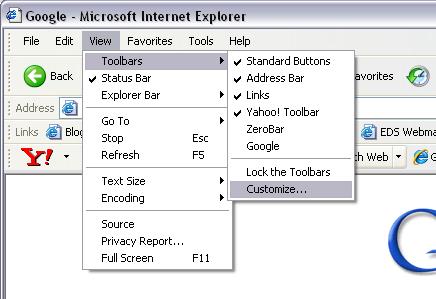
If you want to remove them from your system completely, it's a little more complicated. They are actually entries into your system registry, so you must edit this to remove them.
Start the registry editor by going to "Start" and typing "regedit" into the "Run" dialog and click "OK." Within the registry editor, expand the tree for "HKEY_LOCAL_MACHINE" then "SOFTWARE" then "Microsoft" then "Internet Explorer" then "Extensions." Within that tree there are several folders, and each one of them represents an icon added to your Internet Explorer Toolbar. Find the one with titles in it that read "Party Poker." Right click the folder (in the left part of the Editor Interface) and select "Delete." 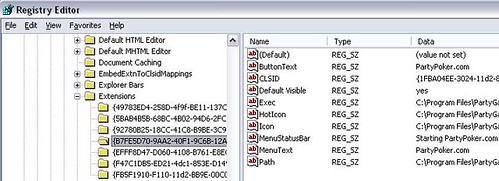
Repeat for whatever icons you want removed. The next time you start Internet Explorer, those Icons will be gone.
I hope this helped some people.














































 Posts
Posts

